Complete Step-by-Step Guide for CGWA NOC Renewal Online (Bhuneer Portal)
Ensure continuous compliance! Follow this essential 8-step process for CGWA NOC Renewal, including mandatory NOCAP data migration, self-compliance reports, and fee submission.
Official Procedure for CGWA Renewal Application (90 Days Prior)
The renewal process must be initiated at least 90 days before your current NOC expiry date. This guide covers the full process, starting with the necessary steps to link your old data before submitting the new renewal application form.
Log In and Initiate the Renewal Application
Log into your registered Bhuneer Portal account. From the dashboard, navigate to the Renewal section to begin the process.
- 1. Login to the Bhuneer Portal Dashboard.
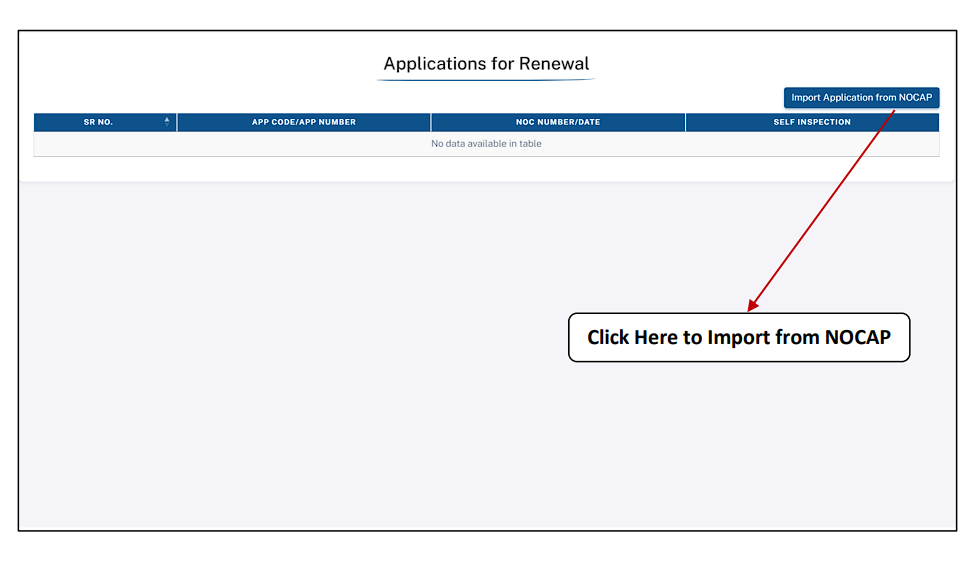
- 2. Click on the “Apply for Renewal of Application” link.
- 3. Click “Import Application from NOCAP” if this is your first renewal on the Bhuneer system.
Import Old NOC Data from NOCAP (If Required)
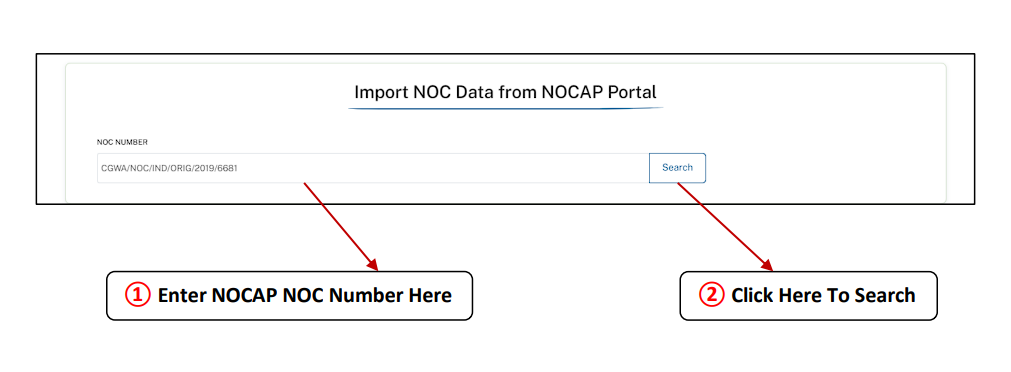
If your current NOC was issued via the old NOCAP system, you must migrate the data first. Enter your old NOCAP NOC Number to link the record with Bhuneer.
Migration Fields:
- Enter NOCAP NOC Number Here
- Click Here To Search
- After searching, verify the partially hidden applicant details.
Verify Contact Details and Upload Old Certificate
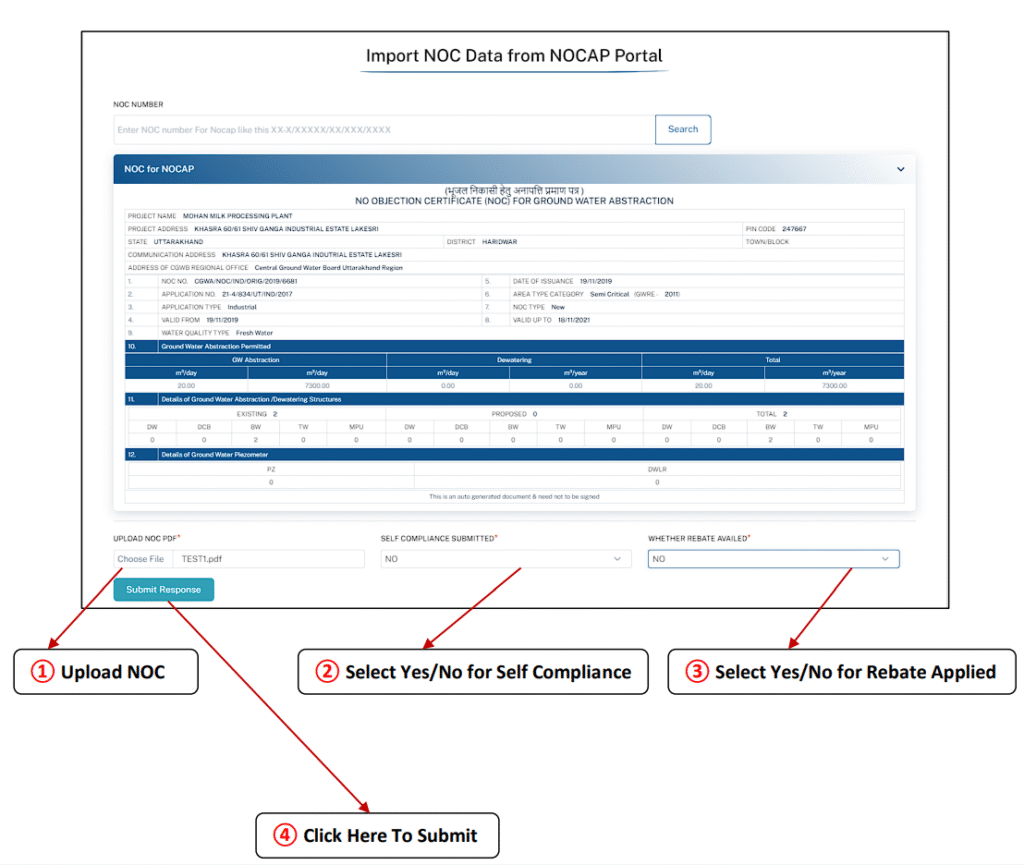
You must verify your registered Email ID and Mobile Number. Then, upload the old NOC certificate to finalize the data linking process.
Verification & Upload:
- Enter Registered Email Id & Mobile No
- Click Verify
- Upload Old NOC (PDF format)
- Click To Submit to receive the new Application Code.
Update and Verify Project Details & Location
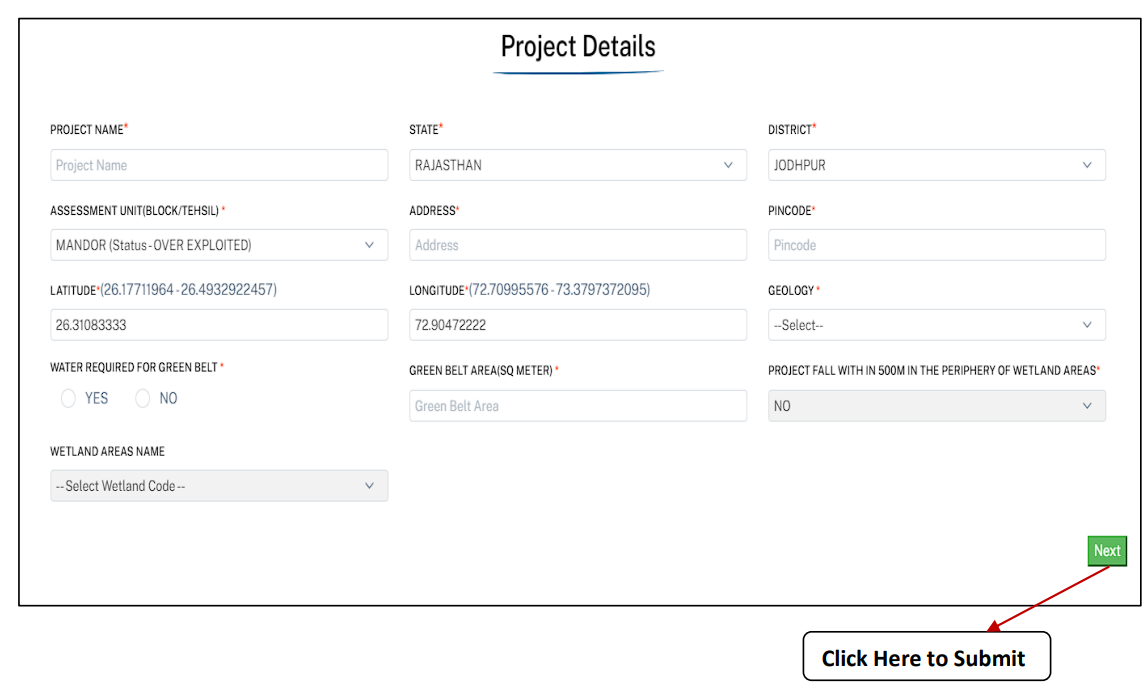
Review the imported Project Details (Section I). Update any changes to location, Project Type, Geology, Green Belt Area, or Wetland details.
Key Review Points:
- Project Address, PIN Code, State, and District.
- Ensure GPS Coordinates (Latitude & Longitude) are accurate.
- Update MSME status if applicable.
Review and Update Water Balance (A – B = C)
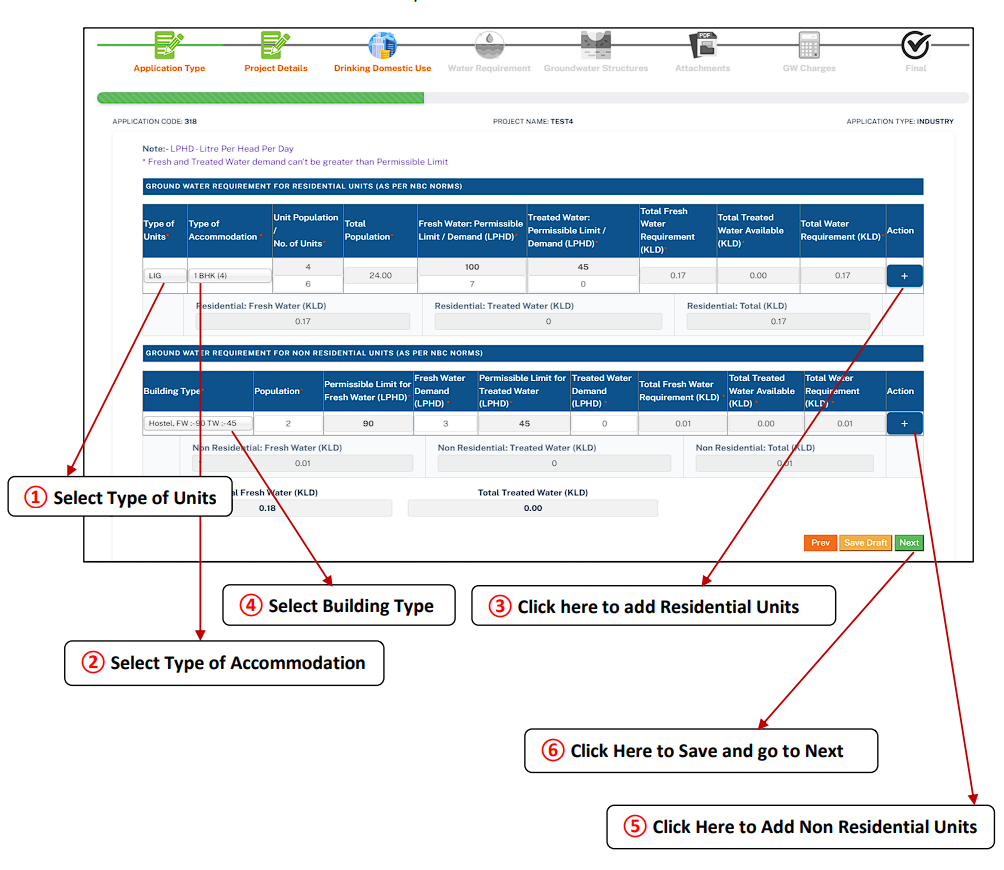
Review the total water requirement, water available from other sources, and the resulting Net Groundwater Requirement. This section must reflect current usage.
Key Renewal Updates:
- Total Water Requirement (A): Ensure industrial, domestic, and greenbelt uses are current.
- Water Availability (B): Update figures for recycled/treated water reuse.
- Net Ground Water Requirement (C): Should match the requested renewal quantum.
Mandatory Submission of Self-Compliance Report
This is a critical part of the CGWA renewal process. You must submit a detailed compliance report ensuring all previous NOC conditions have been met.
Compliance Checklist Includes:
- Functionality of Rainwater Harvesting (RWH) structures.
- Installation and proper functioning of Digital Water Meters (with telemetry).
- Details of Sewage Treatment Plant (STP) and Effluent Treatment Plant (ETP).
Upload New Hydrogeological Report & Audited Documents
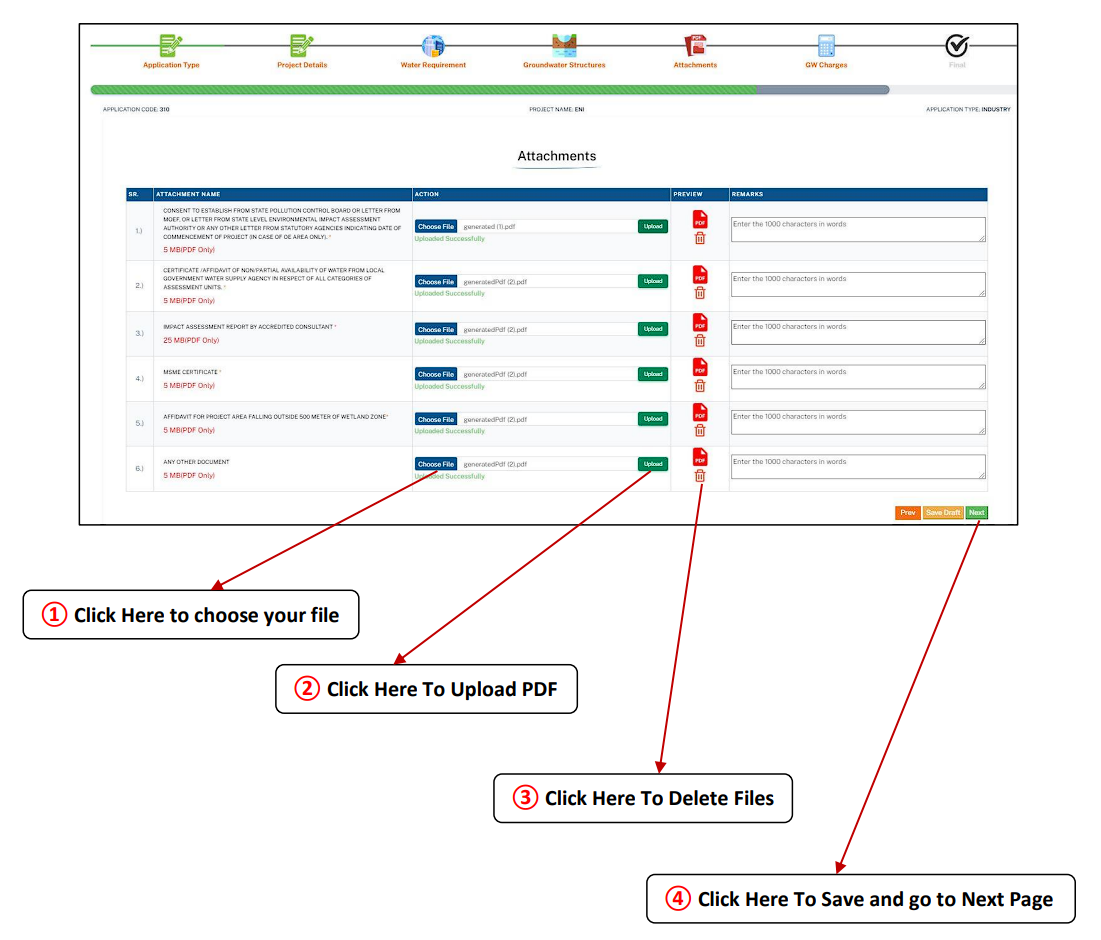
For renewal, updated scientific and regulatory documents are mandatory. Upload these under the Attachments section.
Key Renewal Documents:
- Updated Hydrogeological Report / Impact Assessment Report.
- Water Audit Report (for high-volume users).
- Valid Consent to Operate (CTO) from SPCB.
- RWH structure photographs and details.
Review, Final Submission, and Fee Payment
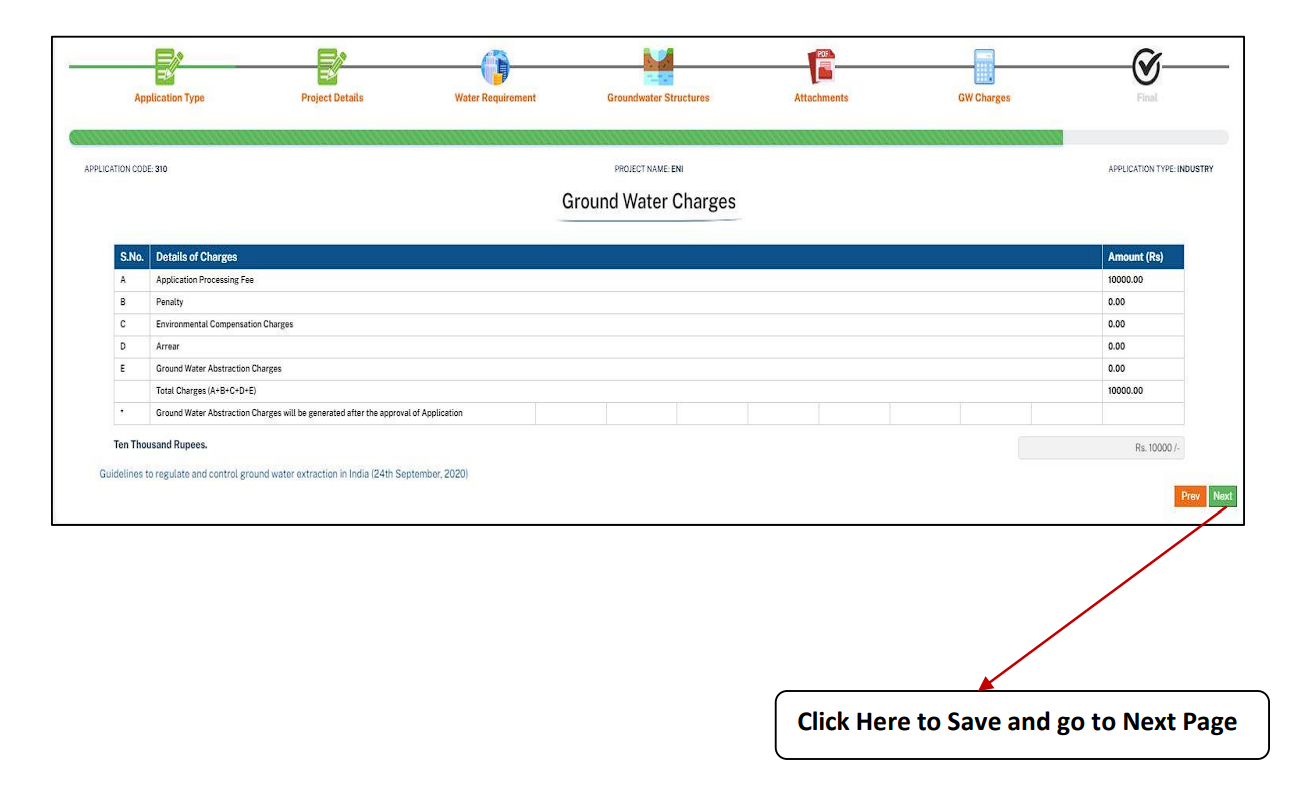
Perform a final review of the entire application. Calculate and pay the required renewal charges based on usage category and zone classification.
Final Steps:
- Application Processing Fee (Renewal fee is variable).
- Pay Environmental Compensation or Arrears (if any).
- Click Save & Submit to complete the renewal application.
CRITICAL WARNING: CGWA Renewal Non-Compliance
Failure to apply for CGWA NOC Renewal at least 90 days before expiry, or non-compliance with the original NOC conditions (especially RWH and metering), will result in the NOC lapsing. Illegal groundwater extraction carries severe penalties (up to ₹2 lakh per month), disconnection, and legal action. Always maintain full compliance.
Essential CGWA Process Guides
- → Step by step process to register on Bhuneer portal
- → Step by Step guide to apply for New CGWA NOC
- → Step by step guide for CGWA Self inspection
- → Step by step process for import of NOCAP Application from CGWA portal
- → CGWA Penalty Provisions & Legal Consequences
- → CGWA NOC Guidelines for Bulk Water Supply
- → CGWA Monitoring and Penalties (2025-26)
- → Environmental Compensation Rules (EC)
- → National Building Code (NBC) 2016 Water Requirements
Request Your Free CGWA Compliance Quote
Simplify your CGWA NOC application process 2025. Get expert support for application filing, document preparation, and compliance.
Call Us Today: 9279550247
Frequently Asked Questions (FAQs) on CGWA NOC Renewal
1. How far in advance must I apply for CGWA NOC renewal?
You must initiate the CGWA NOC renewal process at least 90 days prior to the expiry date of your current certificate. Failure to do so may result in your NOC lapsing, leading to penalties for unauthorized extraction.
2. What is the most critical document required for NOC renewal?
The most critical documents are the updated Hydrogeological Report (or Impact Assessment Report) and the Self-Compliance Report. These prove that you have complied with RWH, metering, and water management conditions from the previous NOC term.
3. Do I need to import my data if my last NOC was on the old NOCAP portal?
Yes, the data migration process (Import Application from NOCAP) is mandatory for the first renewal application submitted on the new Bhuneer Portal if your original NOC was issued under the legacy system.
4. What are the consequences if my NOC expires before I complete renewal?
If your NOC expires, any continued groundwater extraction is considered unauthorized/illegal. This can trigger heavy fines (up to ₹2 lakh per month) and potential disconnection of the abstraction source by the authorities.
5. Is a water audit report necessary for renewal?
A water audit report by a certified auditor is mandatory for renewal, especially for users abstracting high volumes (typically over 100 KLD), to demonstrate water use efficiency and conservation efforts.