Complete Step-by-Step Process Guide 2025: How to Apply for CGWA NOC Online India (Bhuneer Portal)
Your definitive guide to the CGWA NOC application process 2025. Follow these 8 crucial steps to successfully register, fill the form, and secure your groundwater extraction permission, avoiding common rejections.
Official Procedure for CGWA NOC Approval
This guide provides the detailed process to get CGWA permission online. The step by step process to apply CGWA NOC is carried out exclusively through the official Bhuneer Portal (cgwabhuneer.mowr.gov.in). This is essential for all commercial, industrial, and infrastructure groundwater extraction projects.
How to Start the CGWA NOC Online Application Process
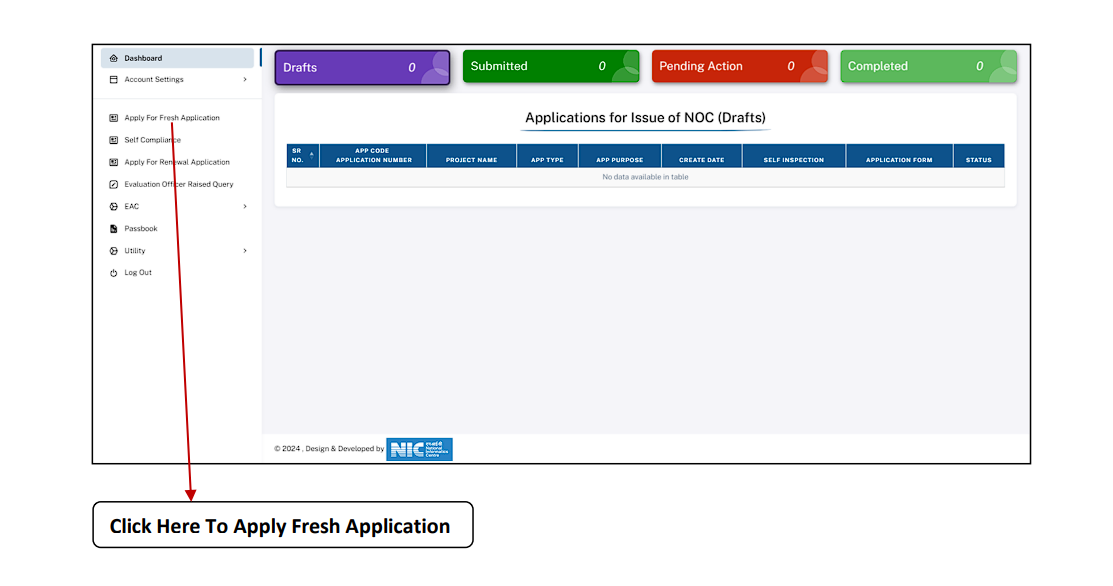
Once you log in to the Bhuneer Portal, you will be redirected to the dashboard. The left side features the ‘Apply for Fresh Application’ button. Click on it to begin your CGWA application process.
- 1. Go to Bhuneer Portal (cgwabhuneer.mowr.gov.in login)
- 2. After login Click ‘Apply For fresh Application’
How to Fill CGWA NOC Application Form (Application Type)
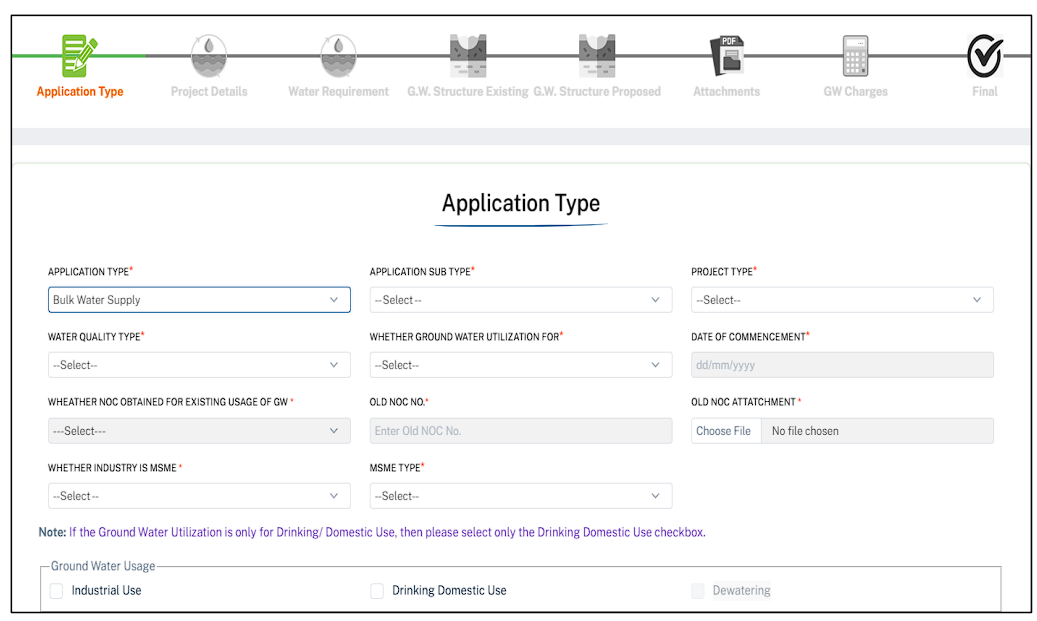
This is the first essential step in the process to obtain CGWA NOC approval. You will be redirected to the Application Form where you define the core nature of your project.
Key Fields in Application Type:
1.Application Type 2.Application Sub Type 3.Project Type 4.Water Quality type 5.Ground Water Utilization For 6.Date of Commencement 7.Existing NOC Status 8.Old NOC No 9.Old NOC Attachment 10.Whether Industry is MSME 11. MSME Type.
Click Next to proceed to the next section.
Entering Project and Location Details for Groundwater Extraction NOC
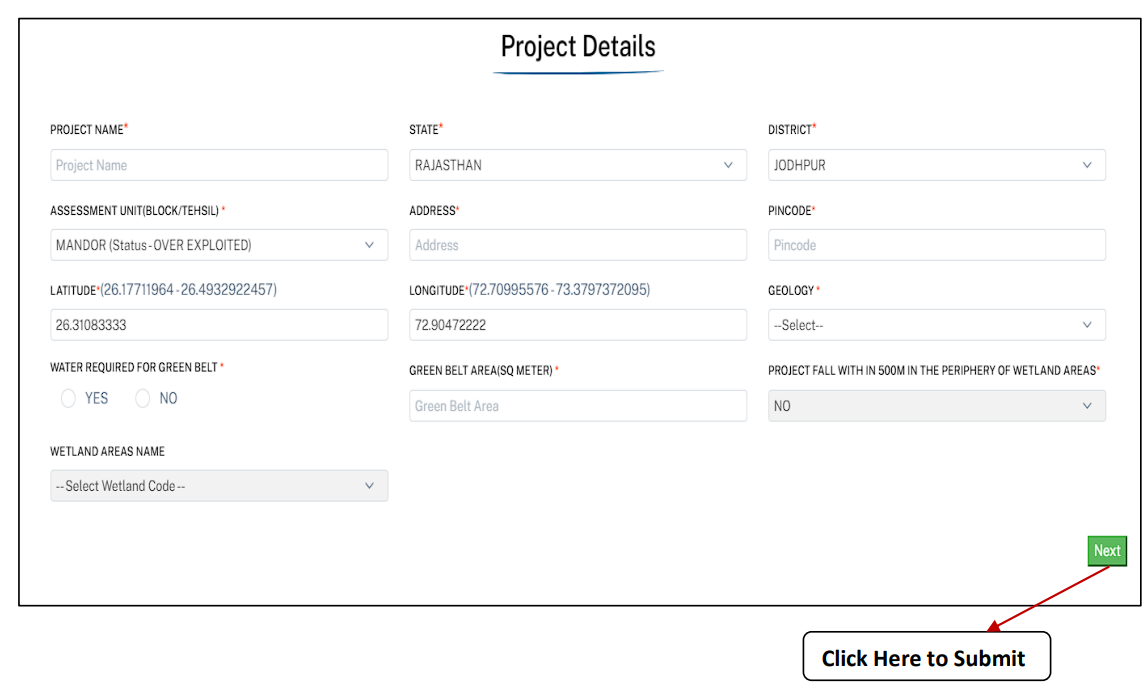
Enter complete project details including name, location, water requirement, greenbelt, and wetland information for assessment. Providing precise GPS coordinates is vital for your groundwater extraction application.
Key Fields in Project Details:
1.Project Name Type 2.Select State 3.Choose Assessment Unit 4.Select relevant Blocks 5.Enter Tehsil 6.Project Address 7.PIN Code 8.Latitude & Longitude 9.Geology 10.Water required for Greenbelt 11. Green Belt Area 12.Wetland Areas Name.
After Filling all above Click Next to proceed.
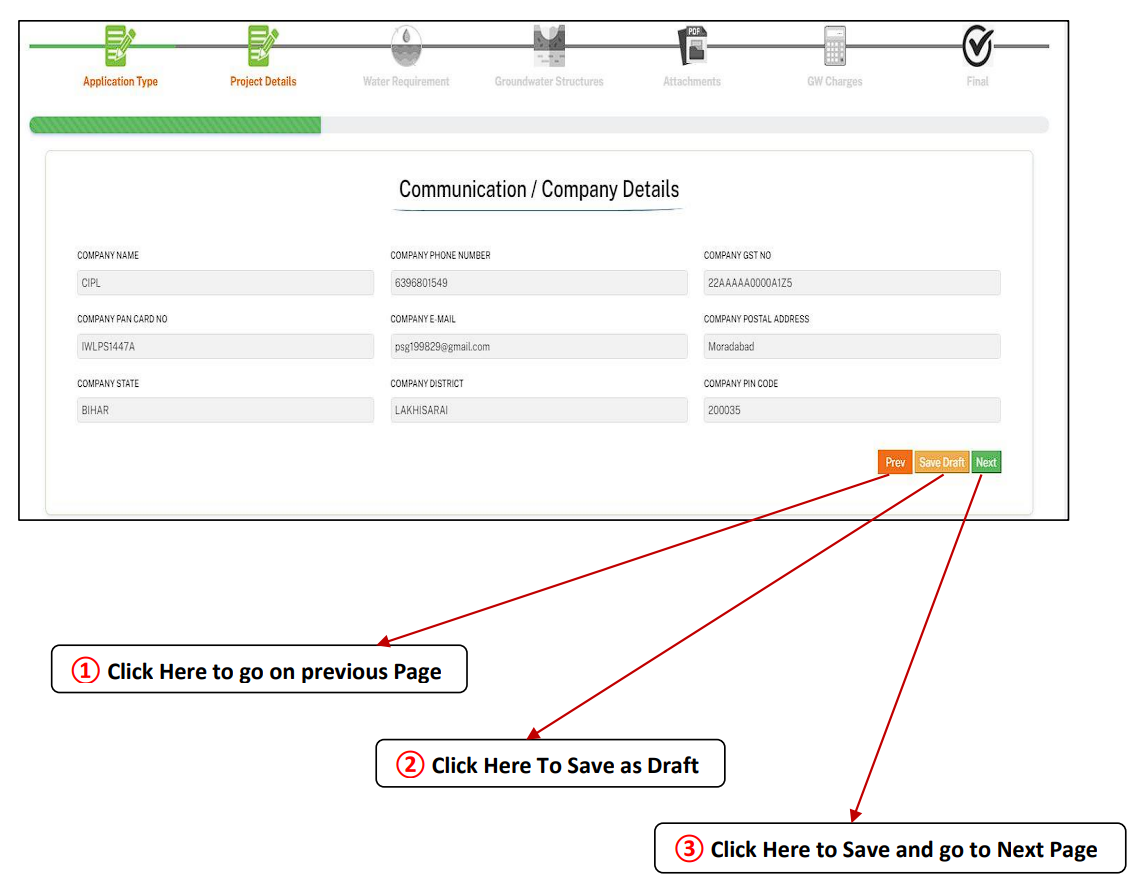
Providing Company Information and Registering on CGWA Portal (User Details)
Enter complete company and communication details including Address, PAN, and GST. This section finalizes your basic CGWA portal registration profile.
Required Company Details:
1.Company Name 2.Phone No. 3.GST No. 4.PAN Card No. 5.Email 6.Postal Address 7.State 8.District 9.PIN Code.
Remember to Save as Draft if you need to pause the application.
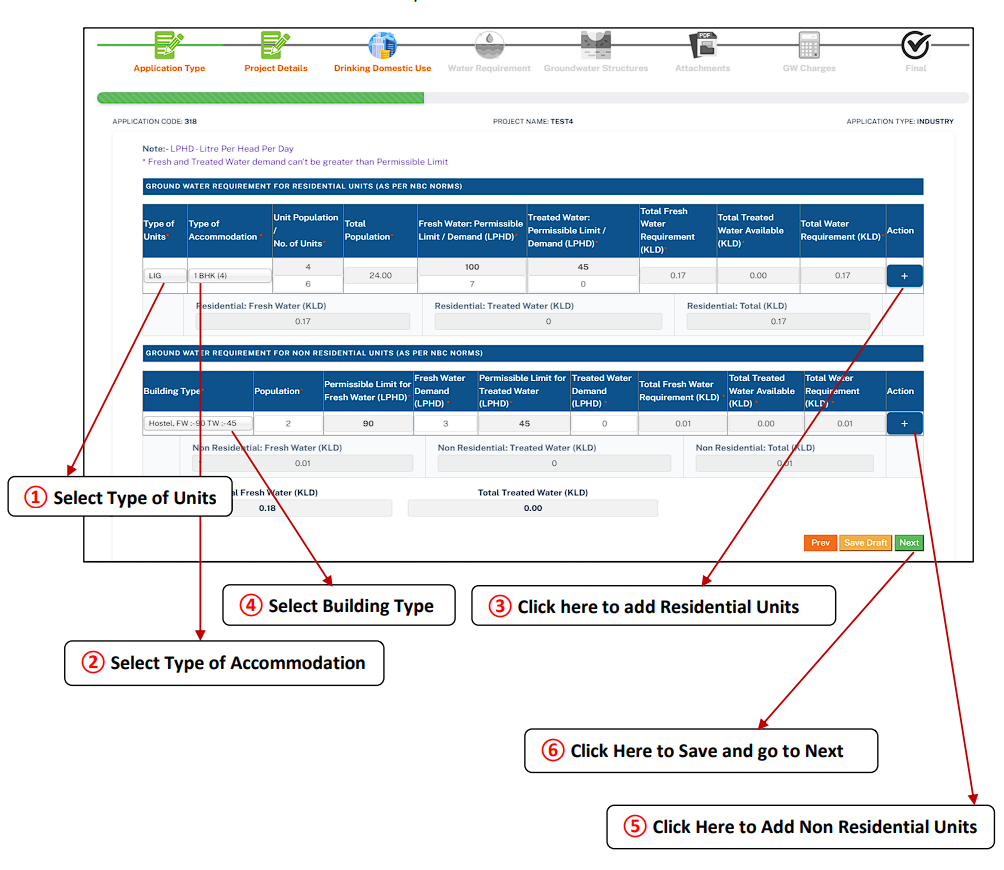
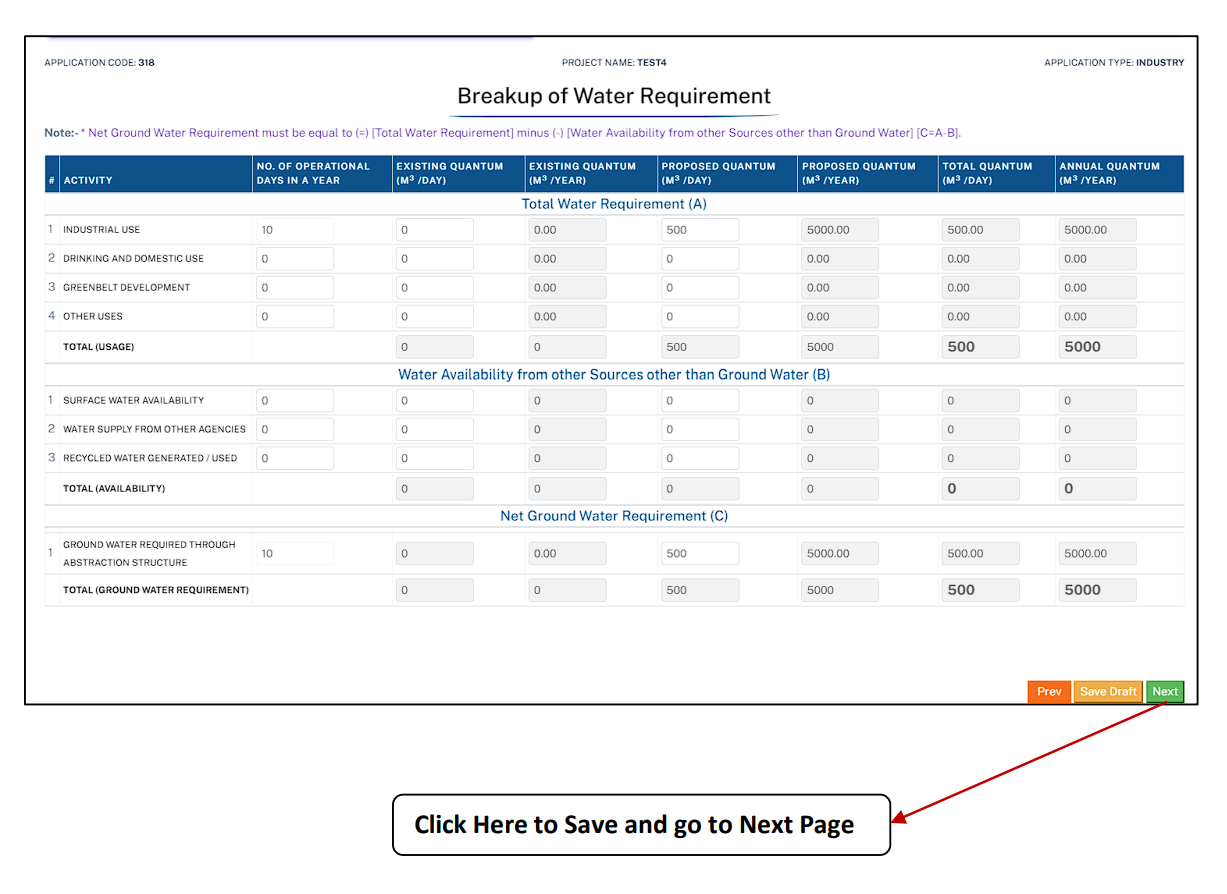
Defining Water Requirements for CGWA NOC Approval
This is a crucial step in the overall procedure for CGWA NOC. You must accurately calculate the Breakup Water Requirement for your project (A – B = C).
- Total Requirement (A): Industrial, Domestic, Greenbelt, Other Uses.
- Water Availability (B): Surface Water, Water Supply Agencies, Recycled/Treated Water.
- Net Ground Water Requirement (C): The actual quantum needed (A-B).
Ensure your proposed daily and annual quantum (m³/day & m³/year) figures are precise.
Detailing Existing & Proposed Ground Water Extraction Structures
Provide details for all existing and proposed structures for groundwater abstraction.
Details for Existing Structures:
Type of Structure/Device (Borewell, Tube well, Dugwell, Pump), Year of Construction, Depth (in meters), and confirmation of a fitted water meter.
Proposed Structures:
Select count for Borewell, Tubewell, Dugwell, Dug cum Borewell, and Pump. Use the “Add to List” button to save each structure’s details.
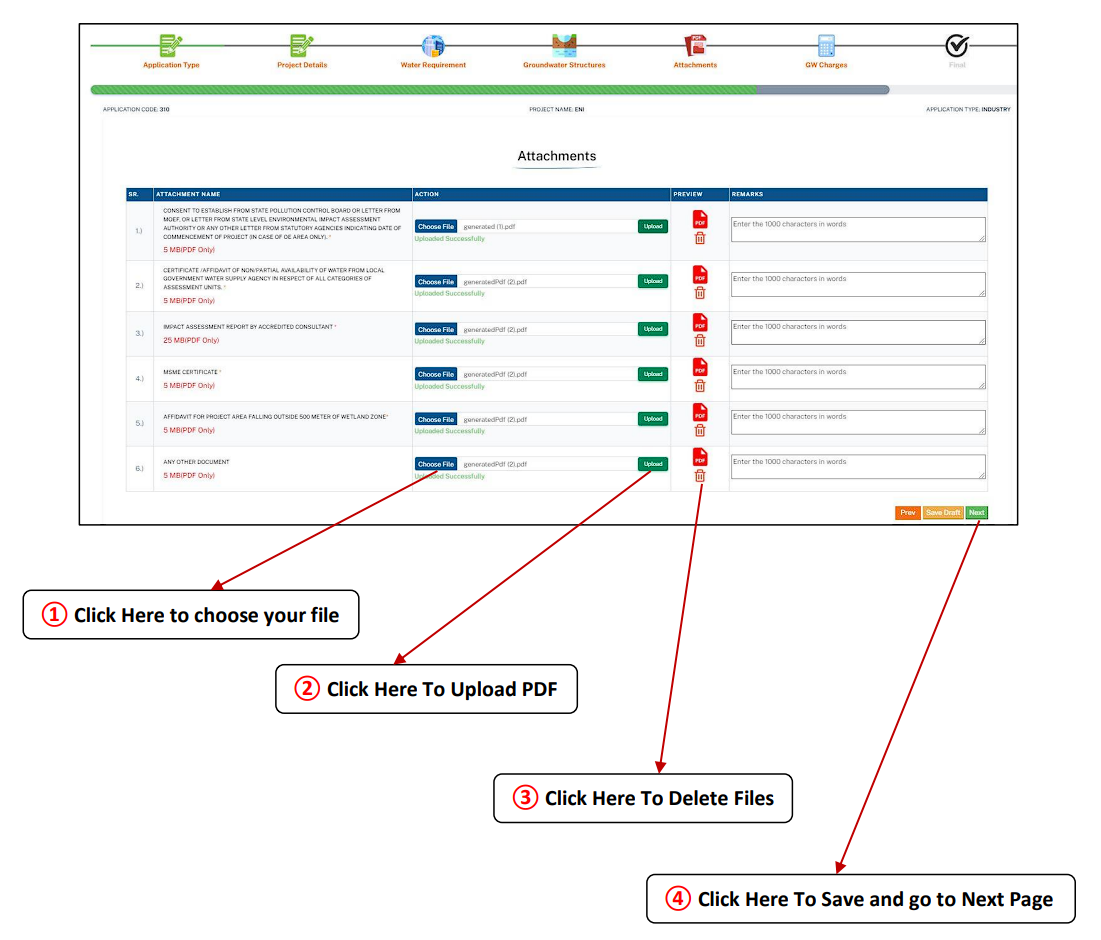
Required Documents and Attachments for CGWA NOC Online Submission
This step is critical. You must upload all documents in PDF format (max 5 MB each) for your CGWA NOC application to be processed.
Key Documents Required:
- Consent to Establish (CTE)
- Non-availability of water Certificate
- Impact Assessment Report
- MSME Certificate (if applicable)
- Affidavit (Wet Land Zone is outside 500m)
Click here to Get All Documents List and Download Forms for CGWA NOC
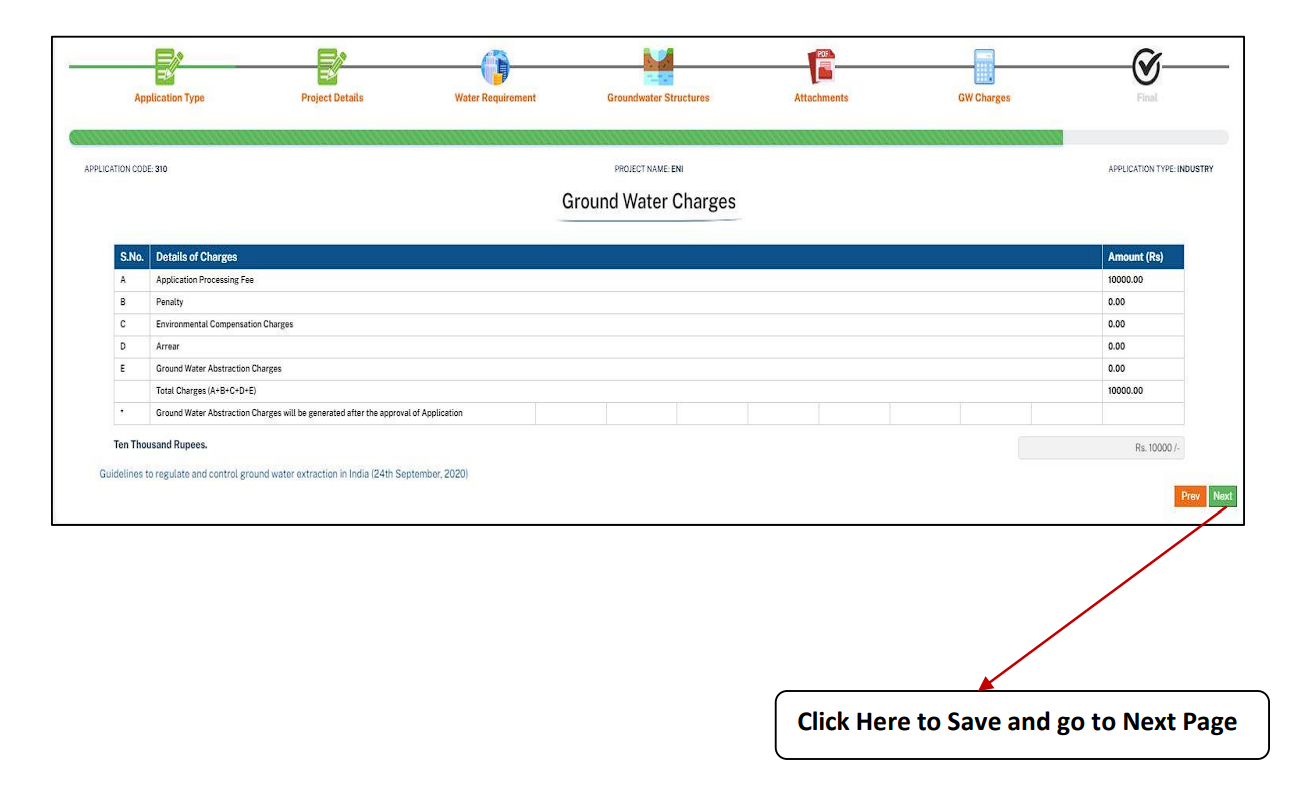
Payment and Finalizing the Detailed Process to Get CGWA Permission
The final step in the detailed process to get CGWA permission is calculating and paying the required ground water charges based on CGWA guidelines.
Charges You May See:
- Application Processing Fee – (₹10,000)
- Penalty, Environmental Compensation, or Arrears (if applicable)
- Ground Water Abstraction Charges (Post-Approval)
After verifying all charges, click Save & Next to submit your final CGWA NOC application.
CRITICAL WARNING: CGWA Non-Compliance and Penalties
Illegal groundwater extraction is a serious offense under the Environment (Protection) Act, 1986. Non-compliance, including failure to apply for NOC, not installing mandatory digital meters, or delaying timely renewal, can result in severe legal action. Penalties often include hefty fines (up to ₹2 lakh per month), disconnection of power supply to the abstraction structure, and potential criminal prosecution. Ensure full compliance with the entire step-by-step process.
Essential CGWA Process Guides
- → Step by step process to register on Bhuneer portal
- → Step by step guide for renewal of CGWA NOC
- → Step by step guide for CGWA Self inspection
- → Step by step process for import of NOCAP Application from CGWA portal
- → CGWA Penalty Provisions & Legal Consequences
- → CGWA NOC Guidelines for Bulk Water Supply
- → CGWA Monitoring and Penalties (2025-26)
- → Environmental Compensation Rules (EC)
- → National Building Code (NBC) 2016 Water Requirements
Request Your Free CGWA Compliance Quote
Simplify your CGWA NOC application process 2025. Get expert support for application filing, document preparation, and compliance.
Call Us Today: 9279550247
Frequently Asked Questions (FAQs) on CGWA NOC Application
1. Which official online portal is mandatory for submitting a Fresh CGWA NOC Application?
The only official portal currently used for the CGWA NOC application process is the Bhuneer Portal (cgwabhuneer.mowr.gov.in).
Click here for the step-by-step process to register on Bhuneer portal.
2. What is the validity period of a CGWA NOC and when should I apply for renewal?
The validity period for a CGWA NOC typically ranges from 2 to 5 years, depending on the purpose of extraction (industrial/infrastructure). You must apply for renewal at least 90 days before the expiry date to ensure continuous compliance.
Click here for the step-by-step guide for renewal of CGWA NOC.
3. I previously applied on the old NOCAP portal. How do I import my data to Bhuneer?
Users with existing NOCs from the legacy NOCAP portal must migrate their data to the new Bhuneer system. This is often required before applying for renewal or modification.
Click here for the step-by-step process for import of NOCAP Application from CGWA portal.
4. What is the mandatory format and maximum size for uploaded documents?
All supporting documents must be uploaded in PDF format, with a maximum file size limit of 5 MB each. Submitting incorrect formats or oversized files is a common cause for application rejection.
5. What is the mandatory Application Processing Fee for the Fresh CGWA Application?
The mandatory Application Processing Fee is ₹10,000. Be aware that other charges, such as Environmental Compensation or Penalty, may apply if there was unauthorized extraction prior to the application.
6. What does the “Net Ground Water Requirement (C)” represent in the application form?
The Net Ground Water Requirement (C) is the final figure for groundwater extraction that you are requesting NOC for. It is calculated as: Total Water Requirement (A) – Water Availability from Other Sources (B).
7. Are there any categories of users exempted from requiring a CGWA NOC?
Yes, certain users are exempted from NOC requirements. These generally include individual domestic users in both rural and urban areas, agricultural users, and small MSMEs abstracting groundwater below 10 KLD (10,000 liters/day). However, compliance rules like installing a digital water meter still apply to many exempted users.